
How to Refresh Your Workspace in Ten Minutes
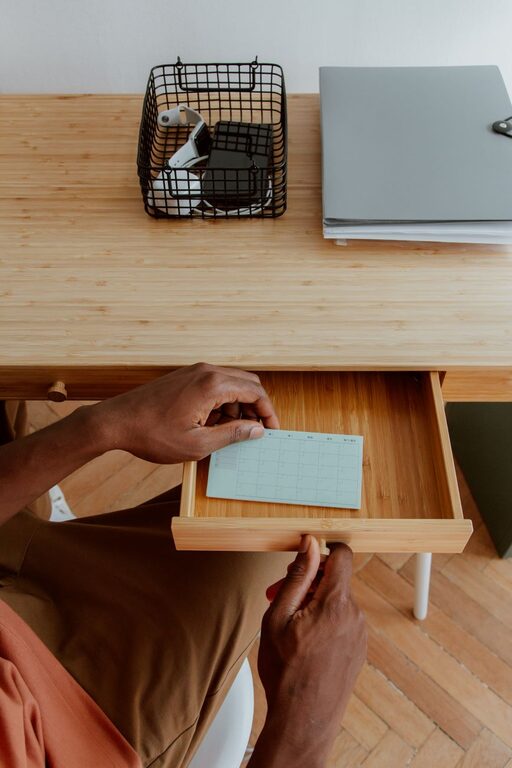
A workspace does not need a complete makeover to feel fresh. In just ten minutes, you can clear visual clutter, improve your comfort, and create a more inviting place to work. This quick reset is useful at the start of the day, between tasks, or whenever your desk begins to feel distracting.
The goal is not perfection. It is to make a few small changes that have an immediate effect. Set a timer, work through the steps below, and stop when the ten minutes are over.
Minute 1: Take a quick look
Before moving anything, pause and scan your workspace. Notice what feels untidy, uncomfortable, or distracting.
Look for:
– Items that do not belong on the desk
– Papers that need sorting
– Cables that are tangled or in the way
– Empty cups, food wrappers, or other trash
– Tools you use often but cannot easily reach
– Lighting or seating that feels uncomfortable
Choose one or two problems to address first. A short reset works best when you focus on visible improvements instead of trying to reorganize everything.
Minutes 2–3: Clear the surface
Start with the main work surface. Remove anything you do not need for your current task.
Create three quick groups:
- **Keep:** Items you use regularly or need right now
- **Move:** Items that belong somewhere else
- **Remove:** Trash, recycling, or items you no longer need
Do not spend too long deciding where every item belongs. If something requires a larger organizing project, place it in a small “deal with later” pile and continue. The purpose of this step is to create open space and reduce distractions.
A clear surface can also make the workspace easier to clean. Wipe away dust or crumbs once the desk is mostly clear. Even a quick pass with a dry or lightly damp cloth can make the area feel noticeably fresher.
Minutes 4–5: Put essential items within reach
Now return only the items you use frequently. Place them where they are easy to reach without blocking your main work area.
Common essentials include:
– Notebook or planner
– Pen or pencil
– Headphones
– Water bottle
– Phone charger
– Keyboard and mouse
– A small lamp or desk light
Keep the center of the desk as open as possible. This gives you room to write, read, or use other materials. Items you use less often can go in a drawer, on a nearby shelf, or in a storage box.
Try to group similar items together. For example, keep writing tools in one container and charging accessories in another. Simple groupings make it easier to find things and return them to the right place later.
Use the one-touch rule
When possible, handle each item only once. Put it directly where it belongs instead of moving it from one temporary pile to another. This saves time and prevents the same clutter from returning.
Minute 6: Tidy cables and technology
Cables can make an otherwise clean workspace look messy. You do not need a complicated system to improve them.
Try these quick fixes:
– Unplug chargers you are not using
– Coil loose cables and secure them with a reusable tie
– Move power strips away from the main work area
– Place frequently used chargers on the same side of the desk
– Remove outdated cables that you no longer recognize or need
Avoid pulling cables tightly or bending them sharply. Leave enough slack for comfortable use, and make sure cords do not create a tripping hazard.
While you are tidying, wipe fingerprints or dust from your screen, keyboard, and mouse using materials suitable for those devices. A cleaner screen and less cluttered setup can make the workspace feel newer without buying anything.
Minute 7: Improve your seating position
A refreshed workspace should also feel comfortable. Adjust your chair so your feet can rest flat or feel supported, and position yourself so you are not leaning too far toward the screen.
Make a few simple checks:
– Keep your shoulders relaxed
– Place your keyboard and mouse where your arms can rest comfortably
– Position the screen so you do not need to look sharply up or down
– Leave enough room to move your chair easily
– Remove objects that press against your legs or feet
You do not need to redesign your entire setup. Small adjustments can make the area feel more usable right away.
If you have been sitting for a while, stand up and stretch briefly. A minute away from the desk can help you return with a clearer sense of what needs changing.
Minute 8: Refresh the lighting
Lighting has a strong effect on how a workspace feels. Open a curtain or blind if natural light is available and comfortable. If the area is too bright, adjust the window covering to reduce glare.
For indoor lighting:
– Turn on a desk lamp if the room feels dim
– Move the lamp so it lights your work without shining directly into your eyes
– Reduce reflections on your screen
– Replace a burned-out bulb when convenient
– Use a softer light in the evening if that feels more comfortable
The best lighting setup depends on the room and the type of work you do. The quick goal is simply to remove harsh shadows, glare, or unnecessary darkness.
Minute 9: Add one pleasant detail
A workspace can be organized and still feel plain. Add one small detail that makes you enjoy being there.
Ideas include:
– A small plant
– A favorite photo
– A simple piece of artwork
– A pleasant scent, if appropriate for your space
– A clean coaster for your drink
– A small object that inspires or encourages you
Keep this step limited to one or two items. Too many decorative objects can quickly become another source of clutter. Choose something that adds warmth without taking away useful work space.
Minute 10: Prepare for the next task
Use the final minute to make starting your next task easier. Open the document you need, place the right notebook on the desk, or write down the first action you plan to take.
A useful next-step note might say:
– Review the first page
– Reply to the two most important messages
– Outline the next section
– Gather the materials for the meeting
– Spend fifteen minutes on the current project
Keep the instruction specific and manageable. “Work on project” is less helpful than “draft the opening paragraph” or “check the three items on the list.”
When the timer ends, take a quick look at the result. The workspace does not need to be perfect. It should simply feel clearer, more comfortable, and ready for use.
Make the ten-minute reset a habit
A quick refresh works best when it becomes part of your routine. You might reset your workspace:
– At the beginning of each workday
– Before switching to a new project
– At the end of the afternoon
– Before leaving a shared workspace
– Whenever clutter starts to slow you down
You can also create a shorter two-minute version for busy days: remove trash, return misplaced items, and clear the center of the desk.
The most useful workspace is not the one that looks perfect in a photo. It is the one that supports the way you actually work. By clearing distractions, improving comfort, and preparing your next step, ten minutes can give your workspace a simple and effective refresh.
Related Post

How to Store Seasonal Clothes Efficiently
Learn how to clean, fold, protect, and organize seasonal clothes so they stay fresh, easy [...]
How to Make Your Kitchen Counters Clutter-Free
Clear kitchen counters make cooking easier and cleaning faster. Use these simple organizing habits to [...]